Check us out on social media
hatfield historical society
  • Home
  • Events
    • Visitors and Workers
  • Collections
    • Foxfire Reports
    • Audio Stories
    • Profiles
  • Resources
    • Transciptions
    • Genealogy
  • Partners
  • Volunteers
  • Blog
  • Contact Us
    • Contact Us
    • Directions
    • Museum Shop
  • DONATE / JOIN
    • Membership
    • Donations
  • Farm Museum CPA
  • Link Page

Ever use a QR Code?

7/18/2013

1 Comment

 
Picture
I have to say it’s helpful when you’re working for a small historical society museum to have a spouse who’s a technology guy. My husband Holly just found a QR code generator called delivr. A QR code (QR stands for Quick Response) is that bar code-like mosaic that you see cropping up on signs and labels. You point your smart device (phone or tablet) at the QR code, and it immediately takes you to a Web location (be it a website, audio or video file, image, etc…) I haven’t paid them much mind because I don’t have a smart device, but I don’t want our museum to miss an opportunity with all those people who are using mainstream technology.

OK, back to my story. I just went to delivr, pasted in our website address, hit ENTER, and generated the code. (Will that really take people to our site?) We took my husband’s smart device, pointed it at the code at right, and straight away it opened up the Hatfield Historical Society home page. It only took a few moments, no joke. And no typing! Check it out.

Now, in addition to putting our web address on our program flyer and event posters, we can add this QR code to make it faster and easier for people to find us.

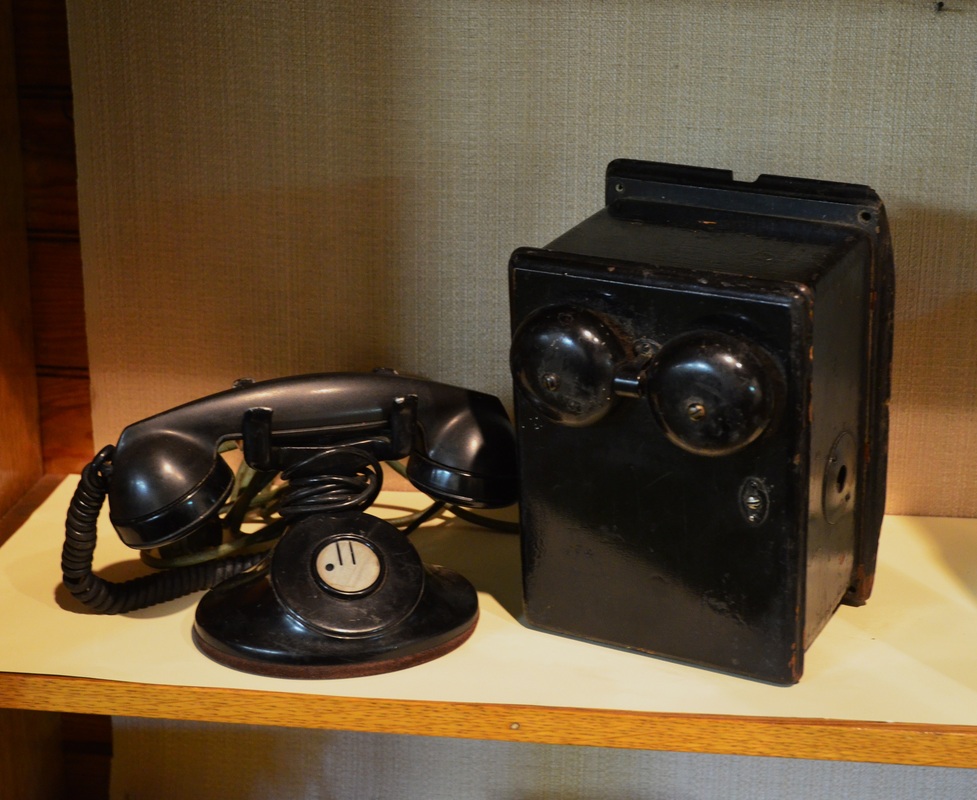
But say I want to use a QR code in the museum to send folks to an audio clip that goes with an artifact – like 102-year-old Mary Riley Pickett talking about the old hand-cranked phone (below) and the “party line” phone system in Hatfield. 
Picture
Picture
I went to our free audio hosting site SoundCloud (see prior blog post), copied the URL for the audio clip, pasted it into delivr and presto -- here it is.Try it!

We’re also curious to know if e-readers like Kindles and Nooks can read the codes. Let us know how or where you’ve used QR codes, and what you like or don’t like about how they’re used.

* By the way, if you happen to be upgrading your tablet and have an earlier model you’d consider donating to our “cozy” museum (that’s old-fashioned code for not enough room and tight exhibit spaces), we’d love to let our visitors who don’t have smart devices yet (most of them) still be able to access additional stories about artifacts – without taking up more room. (You never know unless you ask...)
1 Comment

Got audio stories?

7/17/2013

0 Comments

 
Picture
We have about a dozen digital oral histories with great stories from local seniors talking about growing up in our Connecticut River farming town in the 1930s and ’40s. You can listen to the full interviews in the museum or borrow the CDs from our library or inter-library system. But what if you don’t live in the area? Or you just want a taste?

I’d been wanting to add audio clips to our website from our series of “Hatfield Stories” interviews for a long time, but didn’t know how to do it. And I was pretty sure we had to upgrade to a paid premium account (on Weebly.com, our free website hosting service) to allow audio files to play. Thanks to my husband, who is always trolling for free applications, I found SoundCloud, an audio hosting site. It’s like YouTube for audio-only.

After signing up for an account (did I mention it was free?), I uploaded my mp3 audio clips and an image (optional), wrote a few lines of intro text, and now we’ve got streaming audio for free. Check it out by clicking HERE.

The wonders of the Internet. Don’t believe those people who say technology is getting in the way of people connecting with people. You can let it do that, or you can use it to bring people together who would never have the chance to meet. You’ll meet some great Hatfield folks by listening to the clips in the link above. Enjoy!


0 Comments

Faster, better images for our (and your?) museum!

2/10/2013

 
If you happen to work for a museum or historical society involved in an inventory of your collection, and you want your inventory to include images of artifacts other than scans, here’s something we’re using that’s not only a time-saver but has greatly improved the quality of our shots.

First, let me tell you how we used to do it. I started out shooting images with my digital camera mounted on our new (used) copystand, purchased off eBay. But because I was working alone, not only did I have to place the artifact, check its placement on the camera’s built-in LCD screen, shoot and review the image, then move it slightly to the left or right, and adjust the aperture and ISO, reshoot, recheck and so on. That was taking way too much time when you consider we hope to get an image for every artifact in our collection -- estimated upwards of 8,000!

So I added a volunteer partner (in this case, my husband, who’s an avid photographer) to help me shoot batches of artifacts. With him shooting and making adjustments to the light, and me placing each artifact as I wanted it, this was definitely faster. One session we shot approximately two dozen images of a dozen artifacts. When I copied the files onto the computer and reviewed them a few days later, though, many were a little too dark or not as sharp as I wanted. By this time, of course, I’d replaced all the items in their protective enclosures and didn’t relish the idea of having to do it all again. So, either we’re left with a lower quality image, OR we have to take the time to reshoot and handle the artifact a second time.

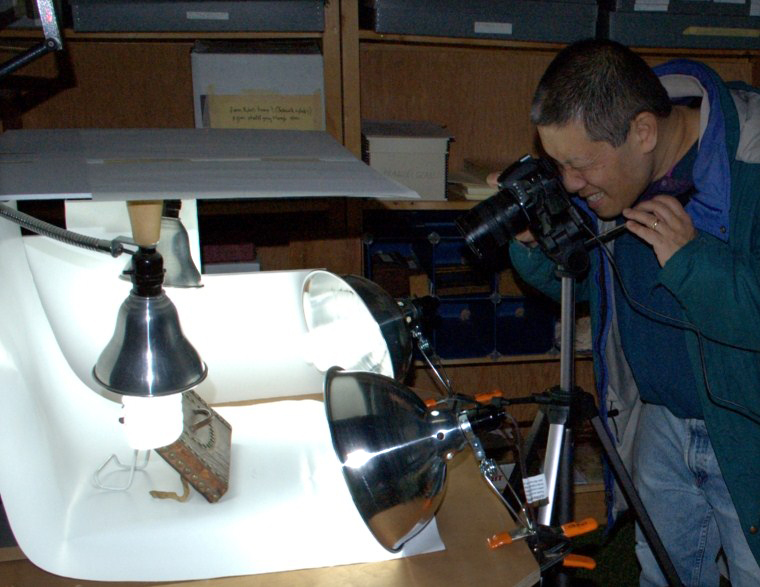
"Tethered" shooting -- how it works. Click images for larger view:

Picture
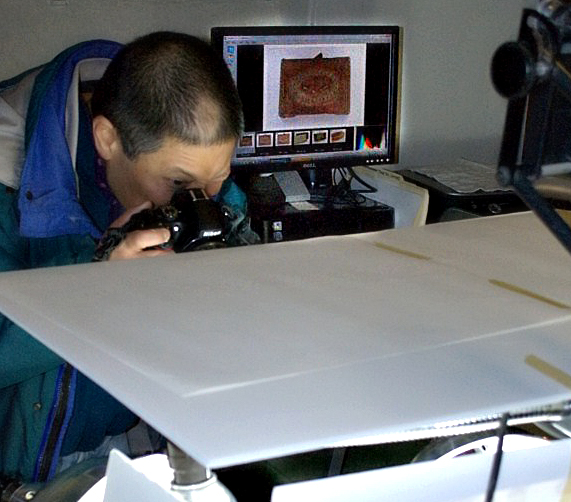
Using a copystand with four compact fluorescent bulbs to shoot 3D artifacts. A cable connects the camera to the computer.
Picture
Look behind the photographer to see the image of the artifact being shot showing up on the computer screen.
Picture
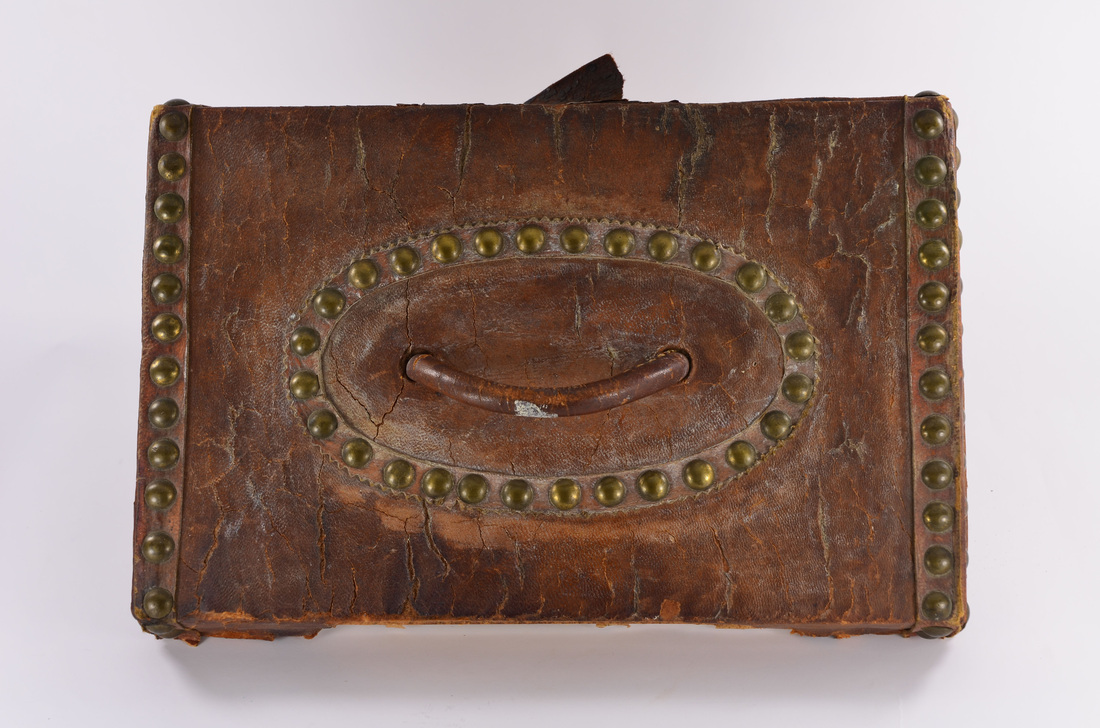
Oliver Smith leather deed box, top view, with brass studs, circa 1830, from the Hatfield Historical Museum.
Enter my technical/computer consultant (also my husband), who suggested I do “tethered” shooting -- meaning, connect the camera directly to the computer so the images would pop up on the computer screen after each shot. This way, problems could be identified and corrected right away. After a bit of online searching, he found me a product that would work with my older camera (a Nikon D70) and our museum’s somewhat older computer (running XP),and was affordable for a historical society with a small budget.

We settled on a product called TetherPro, for $24.99 downloaded, and this works with the USB cable that came with my digital camera. Not only does it streamline the process (it could easily be saving us half the time of gathering images and getting them into the computer), but it also has improved the quality and consistency because I’m reviewing each one in real time at higher magnification and at a much larger size, allowing for immediate correction.(Let me tell you, this makes a huge difference for a mid-50s curator with bad eyes!)

My husband suggests if you are using either Nikon or Canon digital SLRs for your museum work, to take a look at this group of options for tethered shooting, which notes that many Canon digital SLRs come with this type of software (called EOS utility software). So you might already have this capability and not even know it!
http://www.tethertools.com/plugging-in/software/

Here’s to faster, better images in our electronic museum inventories!

P.S. Our inventory project is made possible with a grant through the Community Preservation Act..

Kickstarting the Museum

3/11/2012

 
Picture
This Sunday morning’s email notified me of a new post from Dave Barr’s INNO/Genesis blog. I just signed up for his blog after reading his last post, "Kickstarting the Mobile Museum," because I’d love to add some 21st century elements to our 17th-20th century museum, and I like his ideas.
Today’s offering was about electronic scavenger hunts in museums ('A SCVNGR Trek at the ROM'), using smartphones (iPhone or Android) to access challenge questions from throughout the museum. My family does geocaching (kind of like scavenger hunts in nature, with the help of a hand-held GPS), so I am curious about this. With a quick search on the Internet, I found the following short YouTube video about how this “SCVNGR” hunt application works. Cool! Check it out:

SCVNGR challenge at the Urban Ecology Center

Next I went to the SCVNGR website and I watched the short tutorial on how to make a SCVNGR challenge (click on the “watch how to build” button on the lower right). It seems pretty darn straightforward for people comfortable with technology.

I’m thinking, what a great project for collaboration with our local schools – either through their history curriculum or their technology classes. Let’s get a SCVNGR trek created for Hatfield’s two museums. Of course, I don’t have a smartphone, and lots of people don’t, so we’d also want to create a non-tech version of the scavenger hunt at the same time. In this case, the technology application would not only be kickstarting the mobile museum, but kickstarting the museum in general, as we use today’s media to connect with our community!


    If you like this blog, subscribe!
    If you'd like to be sent a link each time a new entry is posted (which is periodically), please send an email with the subject line SUBSCRIBE to
    hatfieldhistoricalsociety
    @gmail.com

    Curator's musings...

    As the curator of a small town Historical Society museum, I wonder a great many things. Am I alone in these thoughts that come to me while driving, or exercising, or falling asleep at night? Is it unusual to be constructing displays and writing copy in one's head for an enlarged museum space that does not, as yet, exist?

    If you're wondering about the blog title, "bird by bird," see my First Post for an explanation! Click HERE to read it.

    When I'm not thinking about our museum or rehousing artifacts with my fellow museum committee members, I'm working with our exhibit committee to plan physical or virtual exhibits, and working with our board to help fundraise.

    I invite your comments and reactions.

    --Kathie Gow,
    former curator, 2010-2021


    Categories

    All
    18th Century
    19th Century
    Churches & Religion
    Collections Mgt.
    Conservation/preservation
    Death & Dying
    First Post
    Genealogy
    Graveyards
    Inventory Project
    Local Historical Society Issues
    Mass Militia
    Medical Care In Hatfield
    Moving The Museum
    Old Photos
    Oral History
    Other Museums
    Polish Immigration
    Provenance
    Slavery
    Smith Academy
    Storytelling
    Technology
    Tercentenary
    Textiles
    Wars & Rebellions

    Archives

    September 2023
    September 2022
    May 2022
    August 2021
    June 2021
    March 2021
    October 2020
    September 2020
    August 2020
    July 2020
    November 2019
    June 2019
    May 2019
    March 2019
    December 2018
    September 2018
    April 2017
    February 2017
    August 2016
    February 2016
    January 2016
    November 2015
    October 2015
    September 2015
    April 2015
    March 2015
    February 2015
    January 2015
    November 2014
    June 2014
    March 2014
    January 2014
    December 2013
    August 2013
    July 2013
    May 2013
    March 2013
    February 2013
    January 2013
    November 2012
    September 2012
    April 2012
    March 2012
    November 2011
    September 2011
    June 2011
    May 2011
    April 2011
    March 2011
    February 2011
    January 2011
    December 2010

Proudly powered by Weebly
Photo from Cea.